Security
Every screen on this page is the product.
A WordPress site is rarely broken into through something exotic. It is an outdated plugin with a published exploit, a file that changed while nobody was looking, a login page open to the whole internet, or an update that went wrong at 2 a.m. WP Safer watches those four places on every site you connect — and shows you what it found instead of a green tick.
- Every plugin, theme and WordPress version you run is matched against a public vulnerability database.
- Files are compared against the lists wordpress.org publishes, and against a baseline for everything that has no official source.
- The WordPress admin area can be closed to your own addresses only, without touching the public side of the site.
- A full backup is taken before every queued update, and an update that breaks the site is put back automatically.
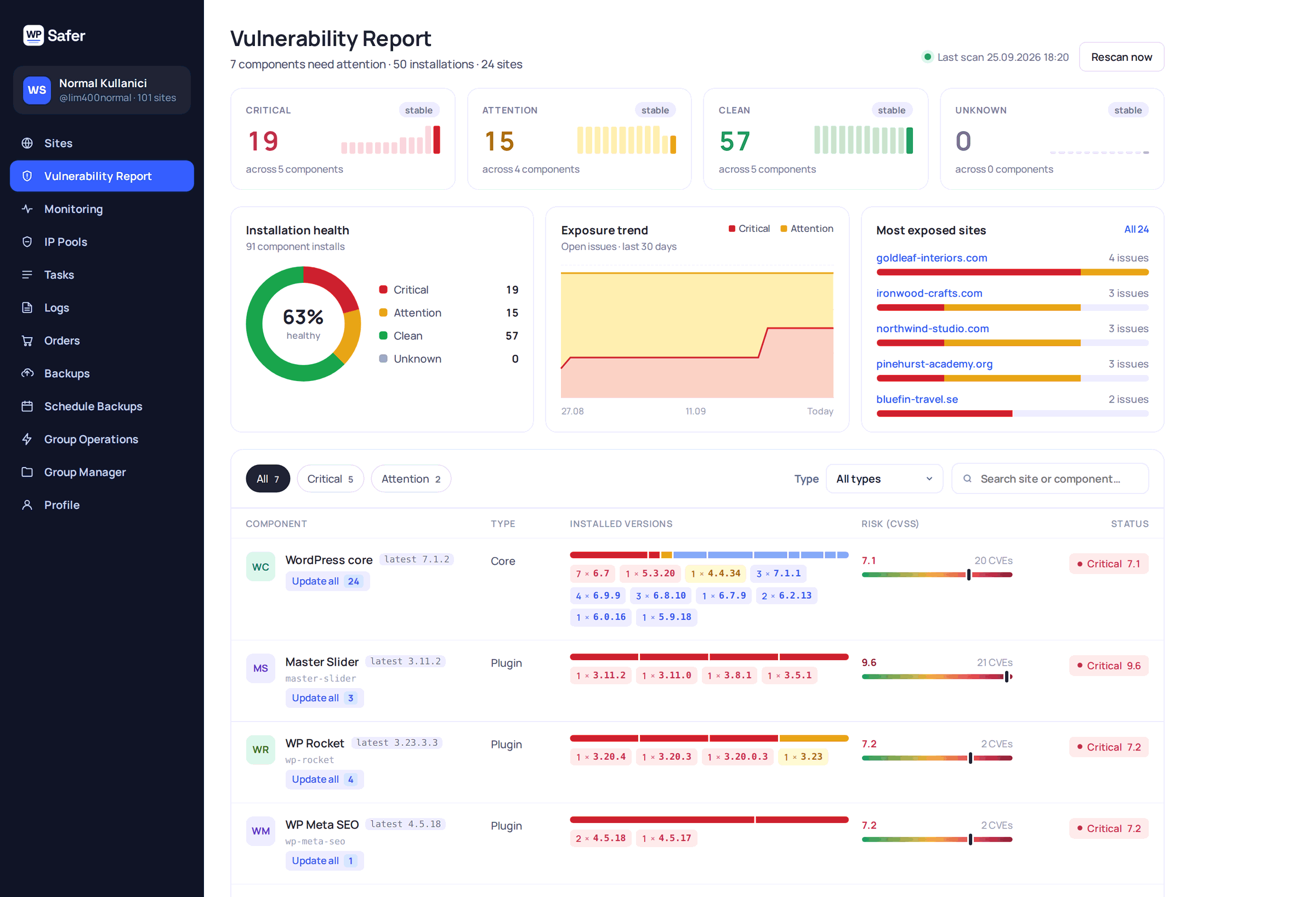
01 — Known vulnerabilities
The exploit was published. Was your site on the list?
Every plugin, theme and WordPress version on every connected site is matched against a public vulnerability database and re-checked at least every 24 hours. You do not browse advisories looking for your own plugins — the panel already knows which ones you run and in which version.
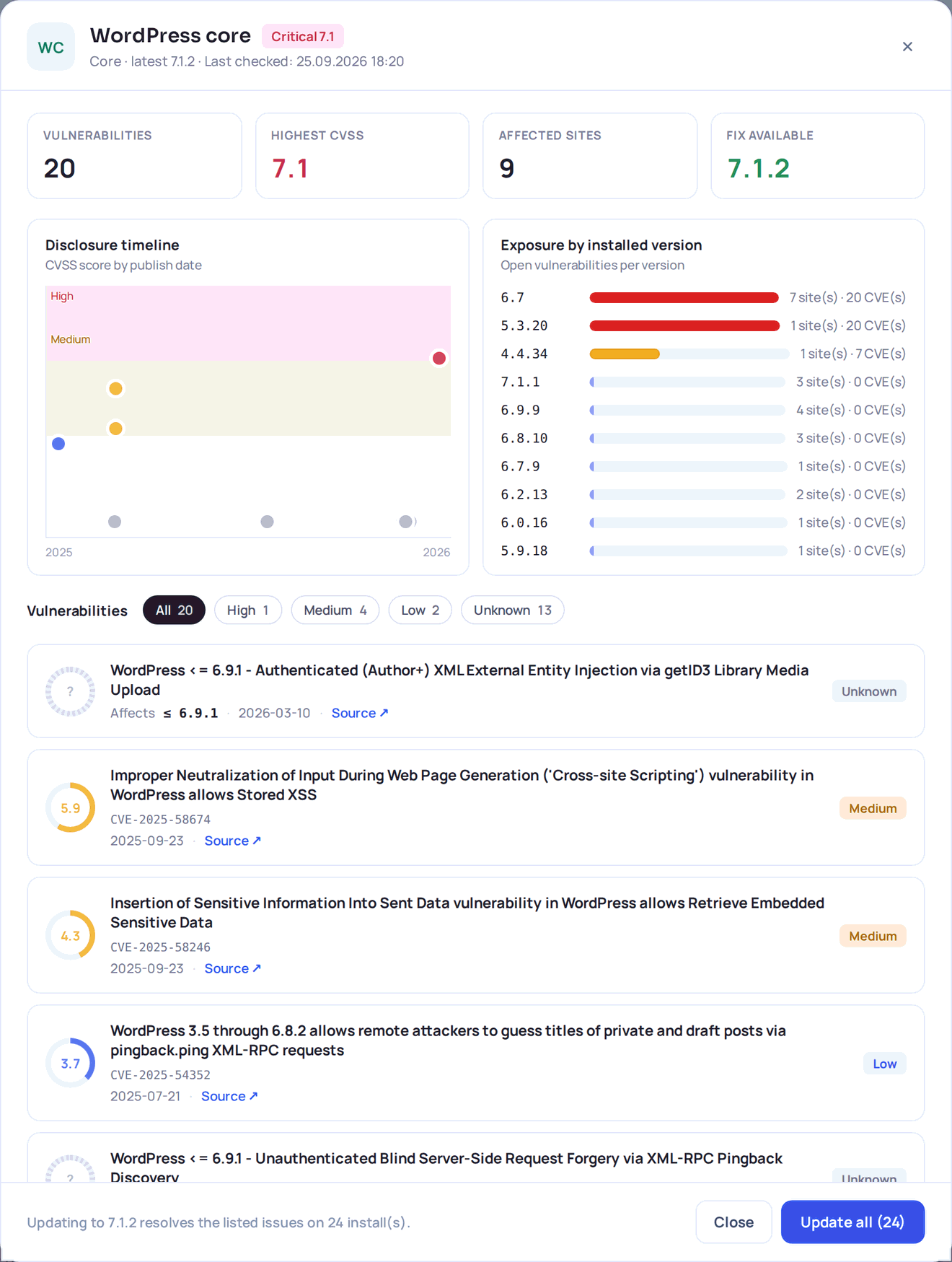
One row per component, not per site
If the same plugin sits on nine sites in three different versions, that is one row with three version chips — not nine rows. Each chip says how many sites run that version and how many issues are open on it.
Clean and unknown are not the same answer
A component we could not look up is reported as unknown, never as clean. A component that is clean but behind the latest release still appears, because a patched old branch is not the same thing as an up-to-date site.
Every claim has a source
Each entry carries its CVE identifier, publication date, CVSS score and a link to the advisory it came from. Nothing is summarised into a colour you cannot check.
Fix it from the same screen
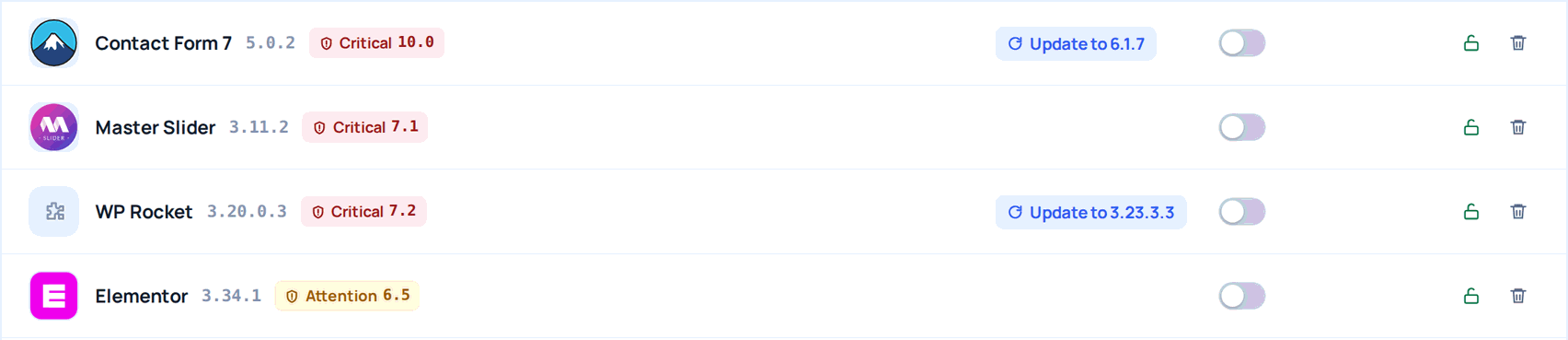
Where an update exists, it can be queued for one site, for every site on one version, or for every affected install at once. A locked or blocked install is still listed — it is exactly the one that needs a human.
The same finding follows you around the panel: an affected site carries a badge in the site list, the component carries its score on the site’s plugin and theme tabs, the result feeds the site’s Site Health score, and a weekly email summarises what is still open.
02 — File integrity
A file changed. You did not change it.
WordPress itself and the plugins you installed from wordpress.org are compared against the file lists wordpress.org publishes. Your themes, premium plugins, must-use plugins and drop-ins have no official list, so they are compared against a baseline taken the first time we scan the site. The comparison runs on the site; only the differences ever reach us.
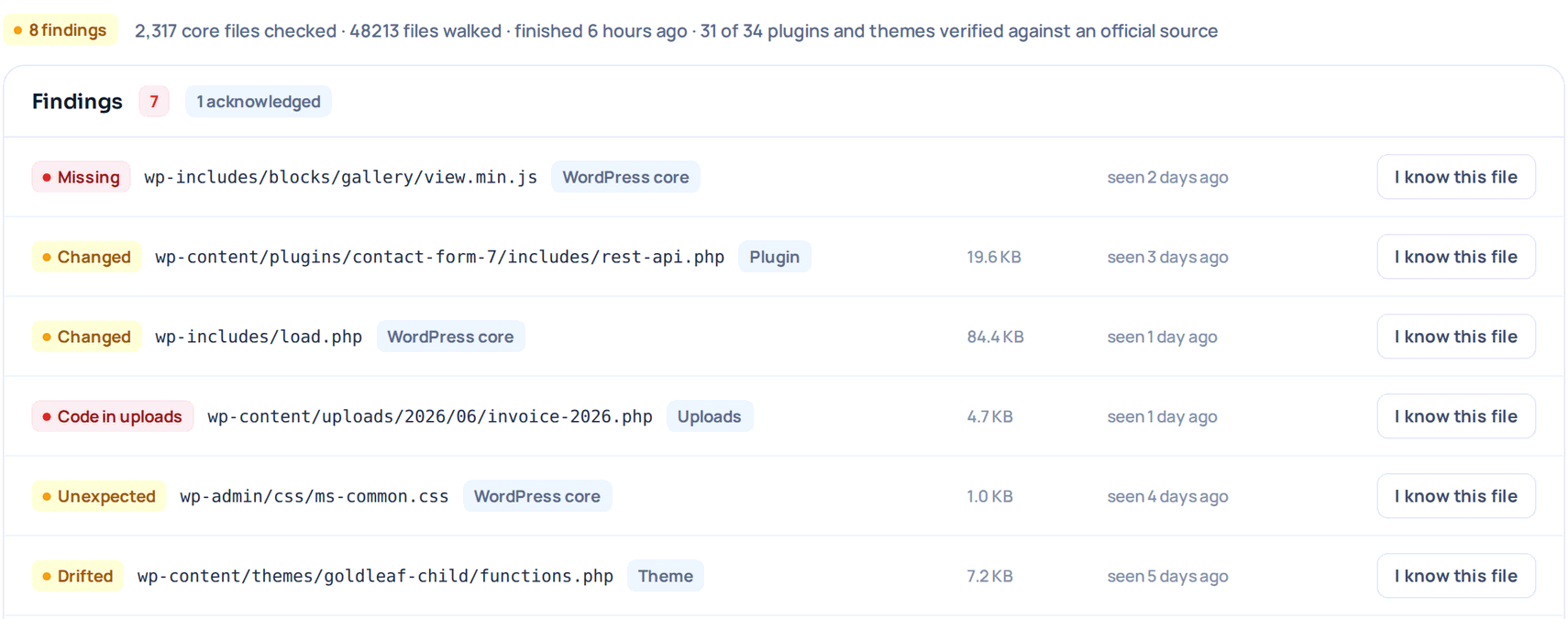
Five kinds of finding, five different sentences
Missing, changed and unexpected mean the official release does not say that. Drifted and new file mean there is no official source and the file moved anyway. Code in uploads means an executable file is sitting in a folder that only ever holds media.
A file you recognise stops being reported
Mark it as known once and it stays in the list, greyed out, without raising anything again. It is not hidden: you should be able to see what you once declared normal.
A failed scan is never shown as clean
A run that finished with zero findings is green. A run that never happened is neutral. A run that failed is red, with the reason. Painting a failed run green would be the worst lie this feature could tell.
On a schedule, and on demand
Scheduled from the Starter plan up — every 7 days on the higher plans, every 30 days on Starter. You can also start a scan yourself at any time.
Findings are summarised in one daily email per account — not one email per site — and the result counts towards the site’s Site Health score. There is also an optional pass that reads the files already flagged, looking for a short list of code patterns that show up in web shells; it is off by default, it names the pattern and shows the line, and nothing is ever quarantined or deleted.
03 — Admin-area firewall
Close the door, leave the shop open.
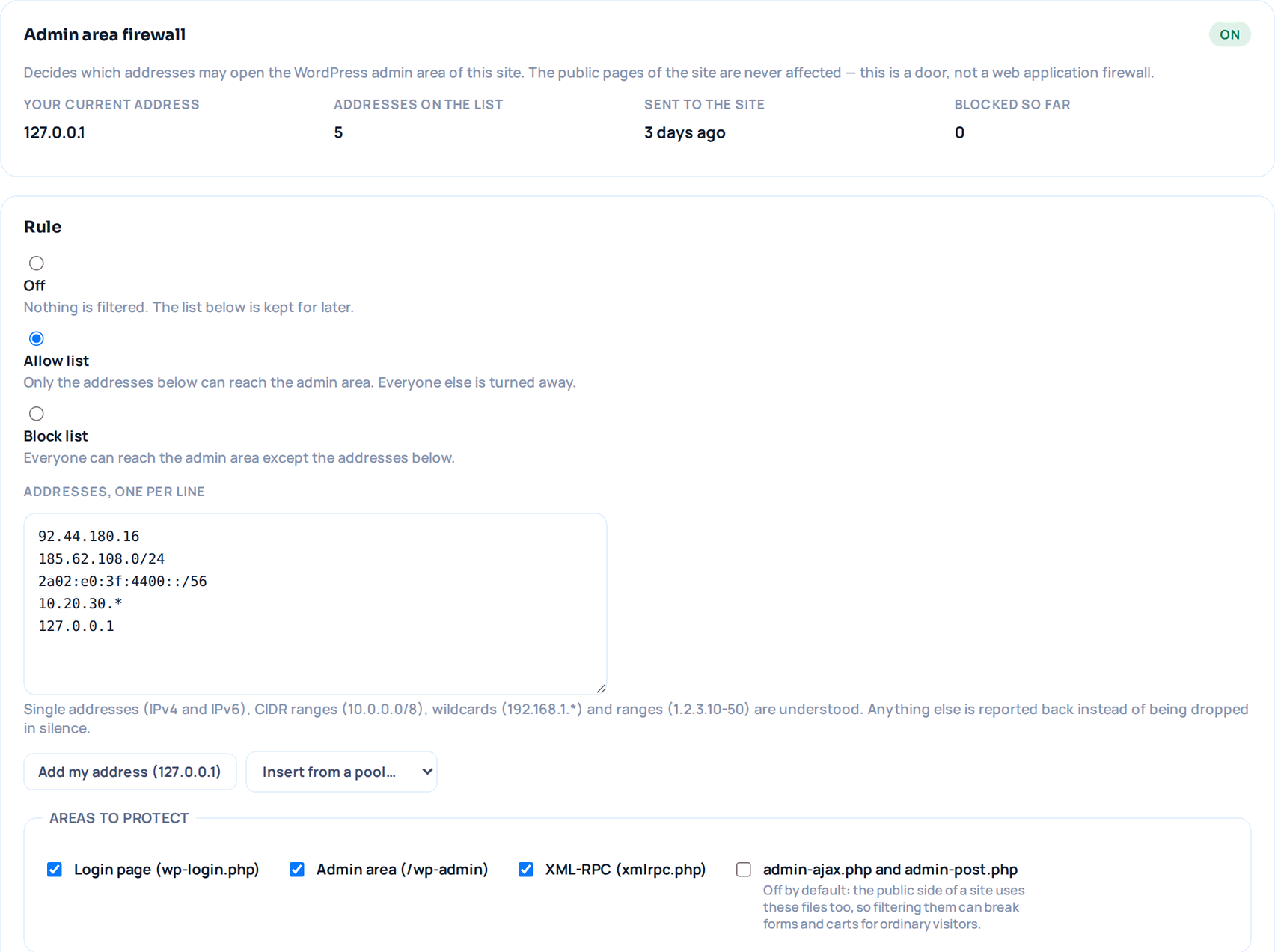
Most brute-force traffic on a WordPress site goes to three files: the login page, the admin area and XML-RPC. You can decide which addresses are allowed to reach them — your office line, a VPN exit, a home address — and everyone else is turned away before WordPress ever loads a user. The public pages of the site are never affected.
The site decides, the panel only records
The rule is enforced by the plugin on your own site. The panel shows you the setting the site itself reports back; if it has drifted from what we saved, you see both values instead of a comfortable single number.
Address sets you write once
Keep the office and VPN ranges in a named pool and drop them into any site, instead of retyping them. Editing a pool never changes a site on its own.
It warns you before you lock yourself out
If your own address is not on the allow list you are told so before saving, and you can add it with one click. A blocked request answers with a plain 403, or goes to an address of your choosing.
admin-ajax stays open by default
The public side of a site uses admin-ajax.php and admin-post.php too, so filtering them can break forms and carts for ordinary visitors. It is a separate switch, off unless you turn it on.
04 — Updates you can undo
Patching fast is a security measure. So is being able to go back.
Knowing about a vulnerability is only half of it — someone still has to install the update, and that is where most people stall, because an update that breaks a client site costs more than the risk it removed. So every queued update is wrapped in a way back.
-
Before
A full backup is taken before the batch runs, and it is a real rollback point: an archive we cannot find in storage, or one taken before another change already landed, does not count as one. A whole round of updates on a site shares a single archive — going back to it undoes the round.
-
During
Before a plugin is updated its current version is copied aside, so it can be put back at file level without touching the database.
-
After
A few minutes later the site is opened again and read — the home page and one inner page found in it. Two consecutive broken reads are needed before anything happens, and "we could not reach the site" is treated as its own answer, never as a failure.
-
If it broke
The update is rolled back automatically where a rollback point exists, automatic updates pause for that site until you resume them, and you are told what was put back. If there is no rollback point, you are told that instead of being told a comforting nothing.
Uptime is checked every 30 seconds on the fastest plan, and every incident is shown next to whatever changed on the site in the minutes before it started. We never claim that change caused the outage — only that the two are close in time, which is exactly what you need to know first.
05 — Backups and storage
The last line, and the one that has to work.
Off-site, in the EU
Backups travel over TLS to a private bucket stored in Amsterdam, not on the same server as the site. A server that is compromised does not take its own backups down with it.
Download links that expire
An archive is never served from a guessable address. Panel downloads use a signed link tied to your session that expires in minutes; the link a site uses to fetch its own archive during a restore is a single-purpose token bound to that one backup.
Every archive is checked on arrival
An archive that cannot be opened, or that arrived without a database, is rejected and retried instead of sitting there looking like a backup.
Restores you can undo
A restore that fails puts the site back automatically, and a restore that succeeded can be undone for 24 hours. A deleted site keeps its backups for a grace period before anything is really removed.
Restoring a site is the most destructive thing this product can do, so it never starts on its own: the chain is resolved and every link is opened and verified first, and if a single piece is missing or corrupt the job does not start at all.
06 — Your WP Safer account
One panel holding every key is worth protecting.
The account that manages all of your sites is itself a target. It is treated like one.
Two-step verification for every account
An authenticator app or an emailed code — you choose — plus ten single-use recovery codes. Two-step verification is being rolled out as a requirement for every account, with a transition period and a reminder rather than a locked door one morning.
Passkeys and security keys
Sign in with Touch ID, Windows Hello or a hardware key instead of typing a code. The private key never leaves your device; we only ever store the public half.
Sensible defaults around the login
Repeated failed attempts are throttled per account, a device you trust can skip the second step for 30 days, and that trust is revoked the moment you change your password, turn two-step verification off or use a recovery code.
API keys that can only do one thing
The key your hosting panel uses to connect sites opens exactly those endpoints and nothing else. It is stored as a hash — the key itself is shown once, when you create it — and revoking it takes effect on the next request.
Site keys can be rotated from the panel without losing the site’s backup and monitoring history, and a site you delete keeps its record for a grace period so you can restore it — or remove it, and its key, for good.
07 — What we do not do
The part most security pages leave out.
Knowing where a tool stops is worth as much as knowing what it does — especially when something has already gone wrong and you are deciding who to call.
- WP Safer is not a web application firewall. It does not inspect visitor traffic or block attacks in real time. The IP rule described above is a door in front of the admin area, not a filter in front of your site.
- We do not remove malware or clean a hacked site. Nothing is quarantined and no file is deleted from your site by us. What we give you is a backup from before it happened and a list of what changed.
- We never call a file malicious. A finding says the file does not match its official release, or that it changed since the last scan. That is an observation. Whether it is an attack, a developer edit or a hosting tweak is a judgement, and it is yours.
- The code-pattern pass is deliberately conservative. It is off by default, per site, and it only reads files that are already flagged. It names the pattern and shows the line it found; it does not produce a verdict.
- Almost nothing happens without you. The one exception is the automatic rollback of an update that broke the site, and it is bounded: two consecutive broken reads from the application layer, a rollback point that exists, and a message telling you what was put back.
See it on your own sites in under two minutes.
Install the plugin, paste your key, and the first vulnerability report and file integrity scan run on their own. Your first WordPress site is free forever.