Linux servers
Linux server backup and uptime monitoring in one panel
Add your Linux servers next to your WordPress sites. Back up folders and databases on a schedule, and get an alert when a server goes offline, a service stops or a disk fills up.
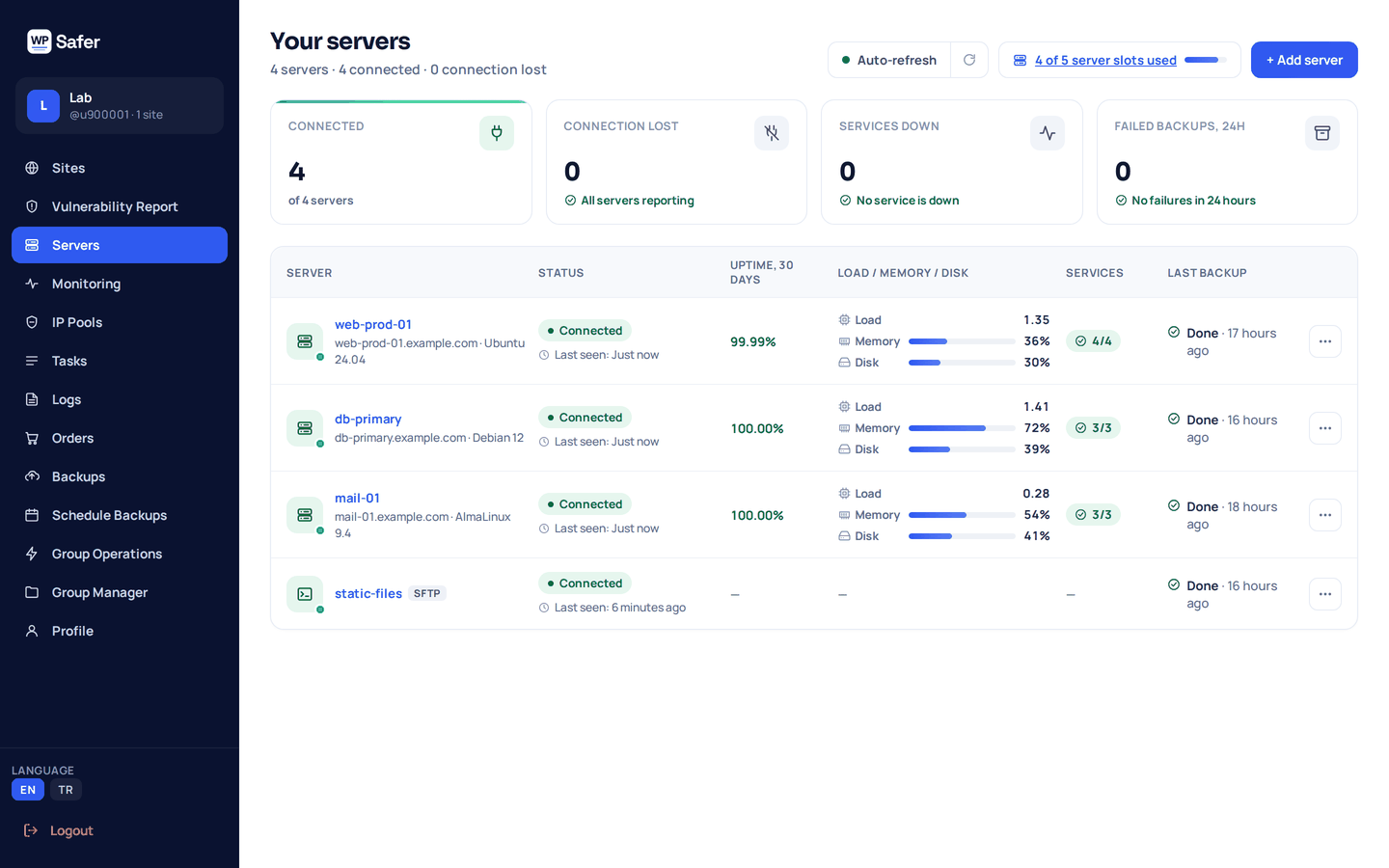
Backups and monitoring usually live in two different tools
A backup job fails quietly. A server goes down at night and you hear about it from a customer. A disk fills up and the next backup cannot finish. Keeping one tool for backups and another for monitoring means two logins, two bills and two places to check.
WP Safer puts both in the Servers menu of the panel you may already use for your WordPress sites. One list shows every server, its last backup and its current status.
01 — How it works
Three steps from a bare server to a monitored, backed-up one
-
Add the server
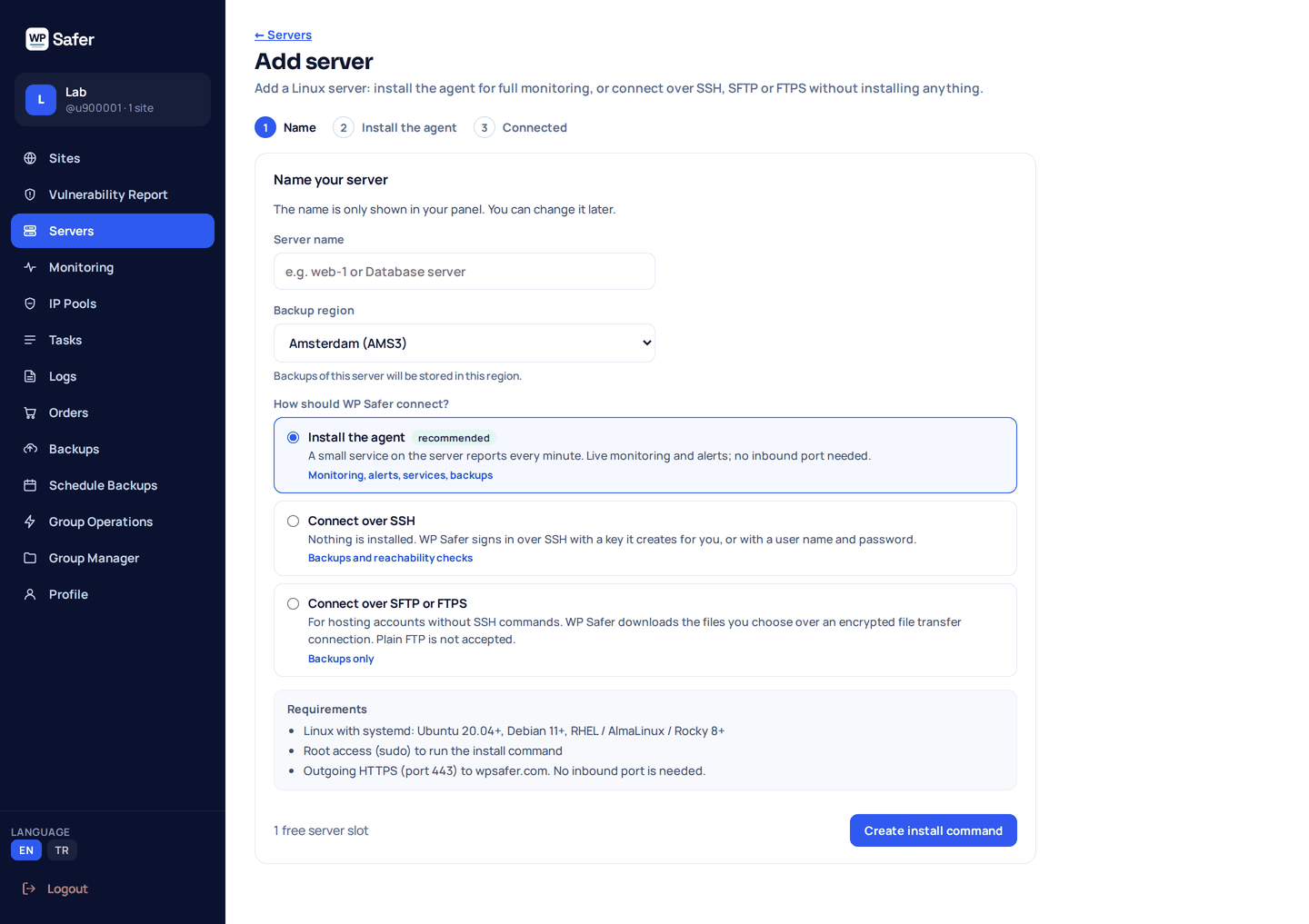
Give it a name, pick the backup region, and choose how WP Safer connects: the lightweight agent, or SSH, SFTP or FTPS with nothing installed.
-
Choose what to back up
Select folders and databases, then set a schedule and how many backups to keep.
-
Watch it
Backups run on schedule. Status, uptime and alerts appear in the same panel as your WordPress sites.
02 — Agent or agentless
Two ways to connect
Lightweight agent
A small bash script that runs as a systemd service and reports every minute. It needs outbound HTTPS on port 443 only, so no inbound port is opened. With the agent you get backups, uptime, service status and disk monitoring.
Agentless: SSH, SFTP or FTPS
Nothing to install. Connect over SSH, SFTP or FTPS — plain FTP is not accepted. You get backups, uptime from reachability checks and outside checks of TCP ports and websites; over SSH or SFTP, load, memory and disk are read every 15 minutes (on shared hosting, your account's disk use).
| Agent | Agentless | |
|---|---|---|
| On the server | Small bash + systemd agent | Nothing |
| Network | Outbound HTTPS (443) only | SSH, SFTP or FTPS |
| Folder backups | Yes | Yes |
| MySQL / MariaDB backups | Yes | Yes |
| PostgreSQL backups | Yes | No |
| Uptime | Every-minute heartbeat | Reachability checks |
| Load, memory and disk | Every minute | Every 15 minutes over SSH or SFTP |
| Service checks | systemd units, processes, TCP ports | TCP ports and websites, from outside every 5 minutes |
| Disk alerts | Yes | No |
03 — Backups
Backups you can plan around
Folders and databases
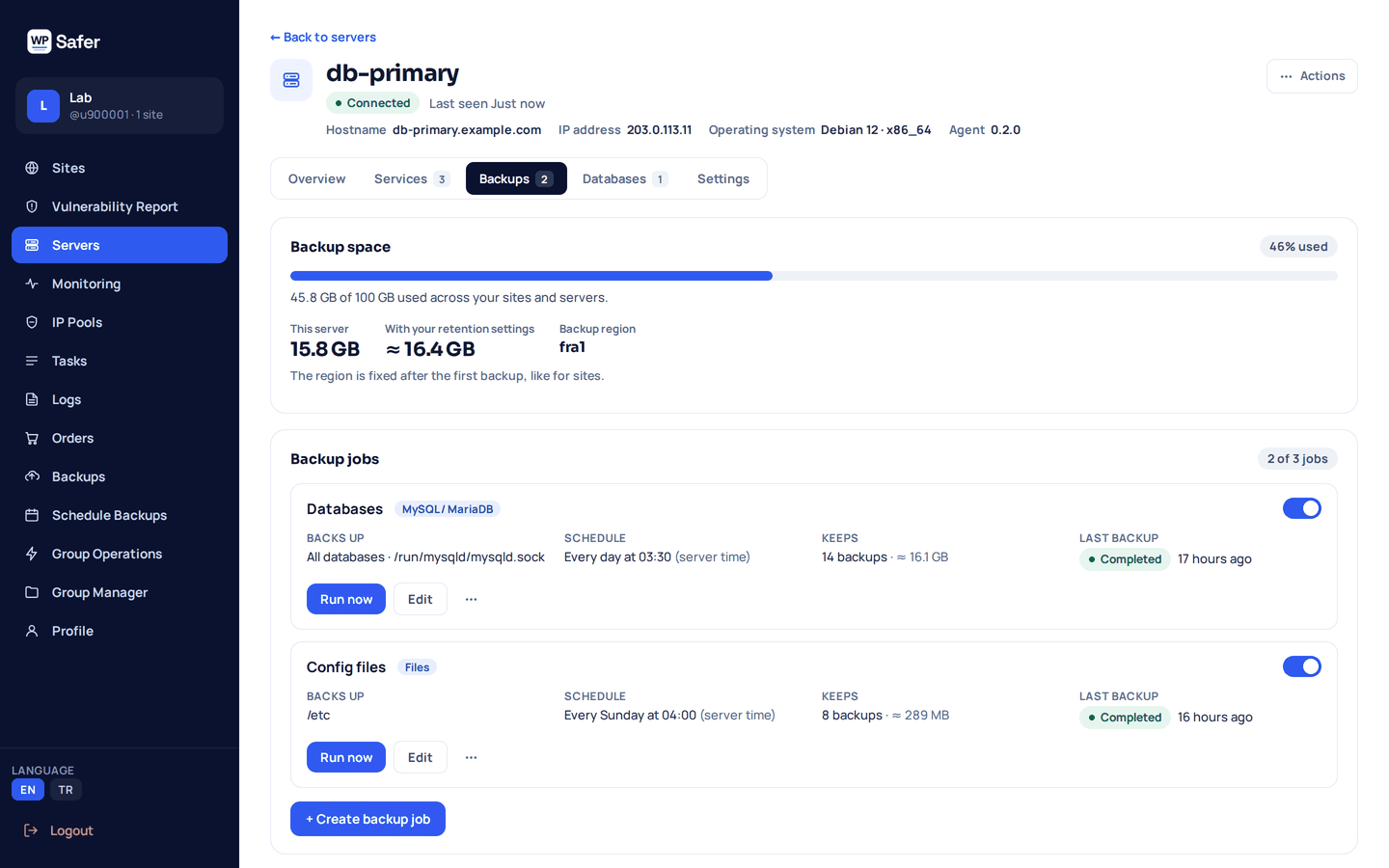
Back up folders plus MySQL and MariaDB — PostgreSQL too with the agent. Each server can hold up to 3 backup jobs and 5 database connections.
Schedule and retention
Run a job daily or weekly, or start one by hand, and keep up to 14 copies. Older copies are removed after a new backup succeeds — never before.
Stored off-site, in the region you pick
Backups are standard tar.gz archives kept in the backup region you choose for the server, not on the server itself. See the backup regions
Download, then restore with guidance
Download a whole backup or just a single database. Restore is not automatic: the panel shows the commands to extract the archive on your server, so you stay in control of what changes.
04 — Monitoring and alerts
Know about problems before your customers do
Offline alerts
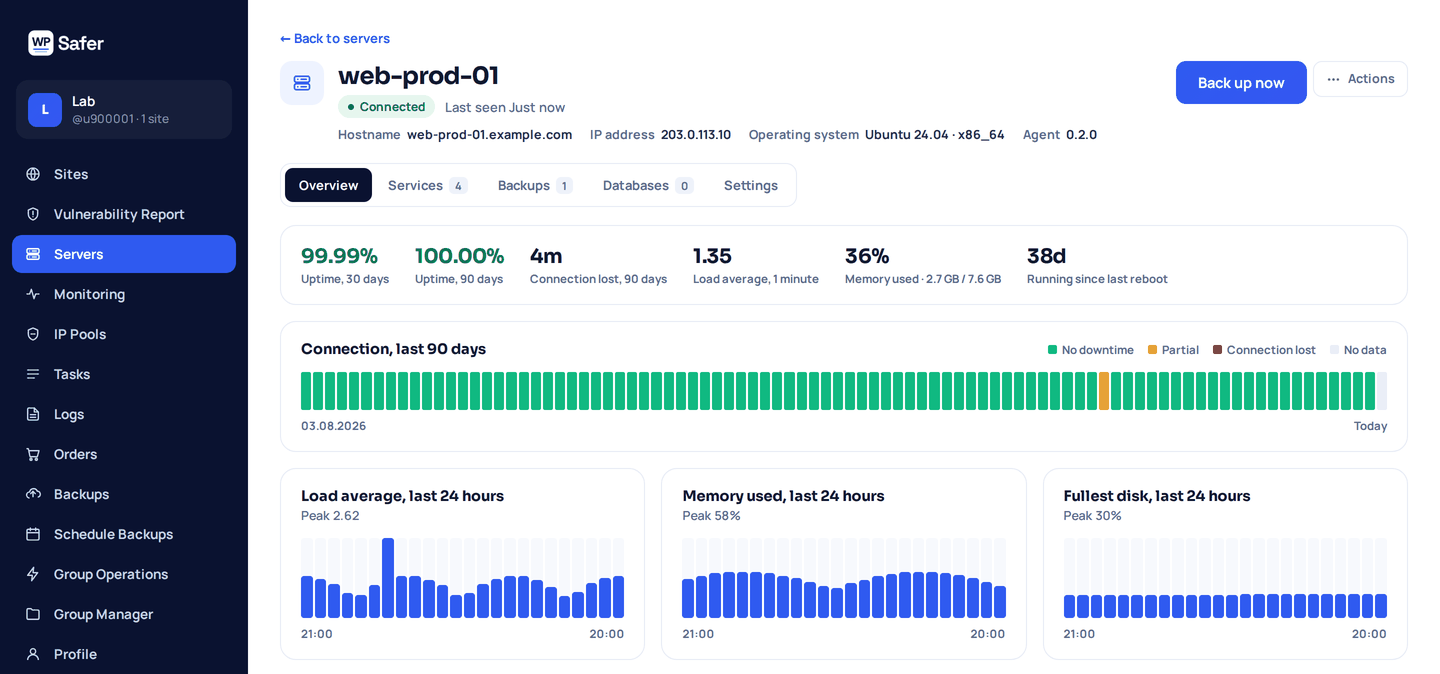
Get an alert when a server stops reporting or can no longer be reached, and another when it is back.
Service status
Watch up to 25 services per server and get an alert when one stops: systemd units, processes or TCP ports with the agent, TCP ports and websites checked from outside without it.
Disk alerts
Get warned when a disk reaches 90% full, before the next backup has nowhere to go (agent).
Uptime history
See 30-day and 90-day uptime and a 90-day connection strip for every server, with load, memory and disk charts for the last 24 hours (agent, or SSH and SFTP).
Alerts go to your account email and to the same alert channels you already use for your WordPress sites: one message when an incident opens, optional reminders while it lasts, and one when it is resolved.
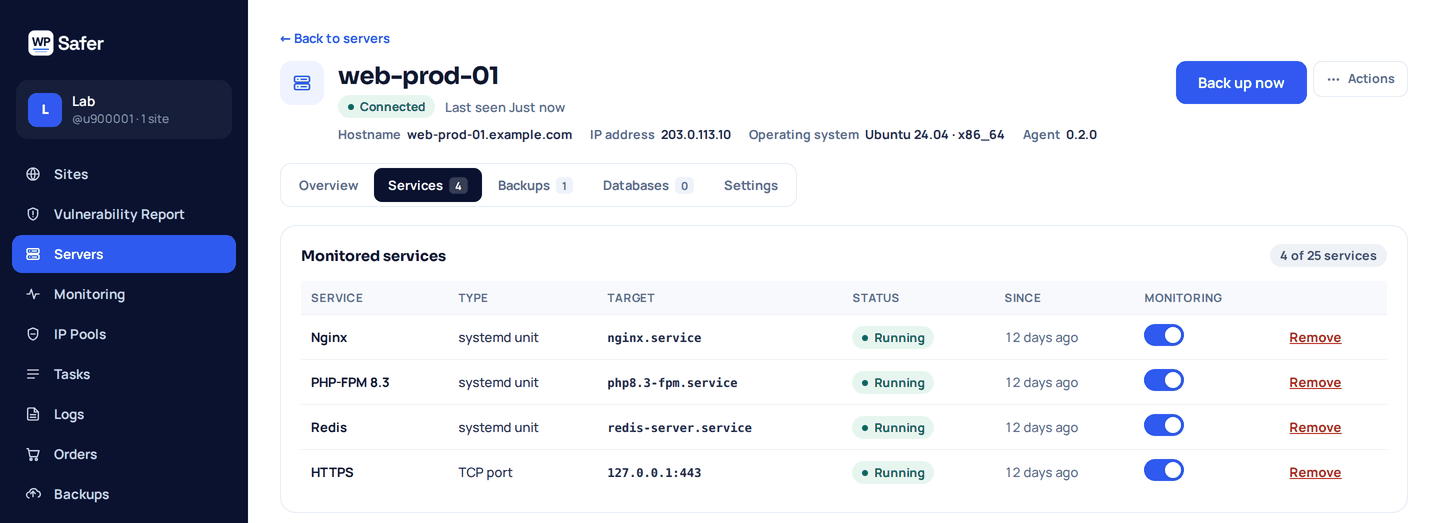
One panel for servers and WordPress sites
If you manage client sites, you already know the cost of switching tools. WP Safer manages your WordPress sites and the Linux servers they run on from one login. See what WP Safer does for WordPress sites
05 — Pricing
Simple pricing, per server
$19 per server per month, or $190 per year. Every server includes 20 GB of backup storage, shared with your sites in one storage pool. Need more? Add a storage pack:
| Extra storage | Price per month |
|---|---|
| 100 GB | $9 |
| 250 GB | $19 |
| 500 GB | $29 |
| 1 TB | $54 |
| 2 TB | $99 |
There is no free plan for servers, and every server purchase is covered by our 14-day money-back guarantee. Full pricing
Frequently asked questions
Can WP Safer back up a Linux server without installing anything?
Yes. Connect over SSH, SFTP or FTPS and back up folders and MySQL or MariaDB databases. Uptime comes from reachability checks, TCP ports and websites are checked from outside, and over SSH or SFTP load, memory and disk are read every 15 minutes. Disk alerts need the agent.
What does the agent need?
A Linux server with systemd (Ubuntu 20.04+, Debian 11+, RHEL, AlmaLinux or Rocky 8+), root access to run the install command once, and outbound HTTPS on port 443. No inbound port has to be opened.
Which databases can I back up?
MySQL and MariaDB with either connection type, and PostgreSQL with the agent.
Can I restore a backup from the panel?
Restore is not automatic. You download the backup — the whole archive or a single database — and the panel shows the commands to extract it on your server, so you decide what changes and when.
How am I alerted?
By email, and on the same alert channels you already use for your WordPress sites. You get a message when an incident opens, optional reminders while it lasts, and one when it is resolved.
Is plain FTP supported?
No. Use SFTP, FTPS or SSH, so credentials and files never travel unencrypted.
How much does it cost, and is there a free plan?
$19 per server per month, or $190 per year, with 20 GB of backup storage included for each server. There is no free plan for servers, and every server purchase is covered by our 14-day money-back guarantee.
Start protecting your servers
Add your first Linux server in a few minutes and see its backups and uptime next to your WordPress sites.